Appointment scheduling
Book, reschedule, and track every appointment with status at a glance.
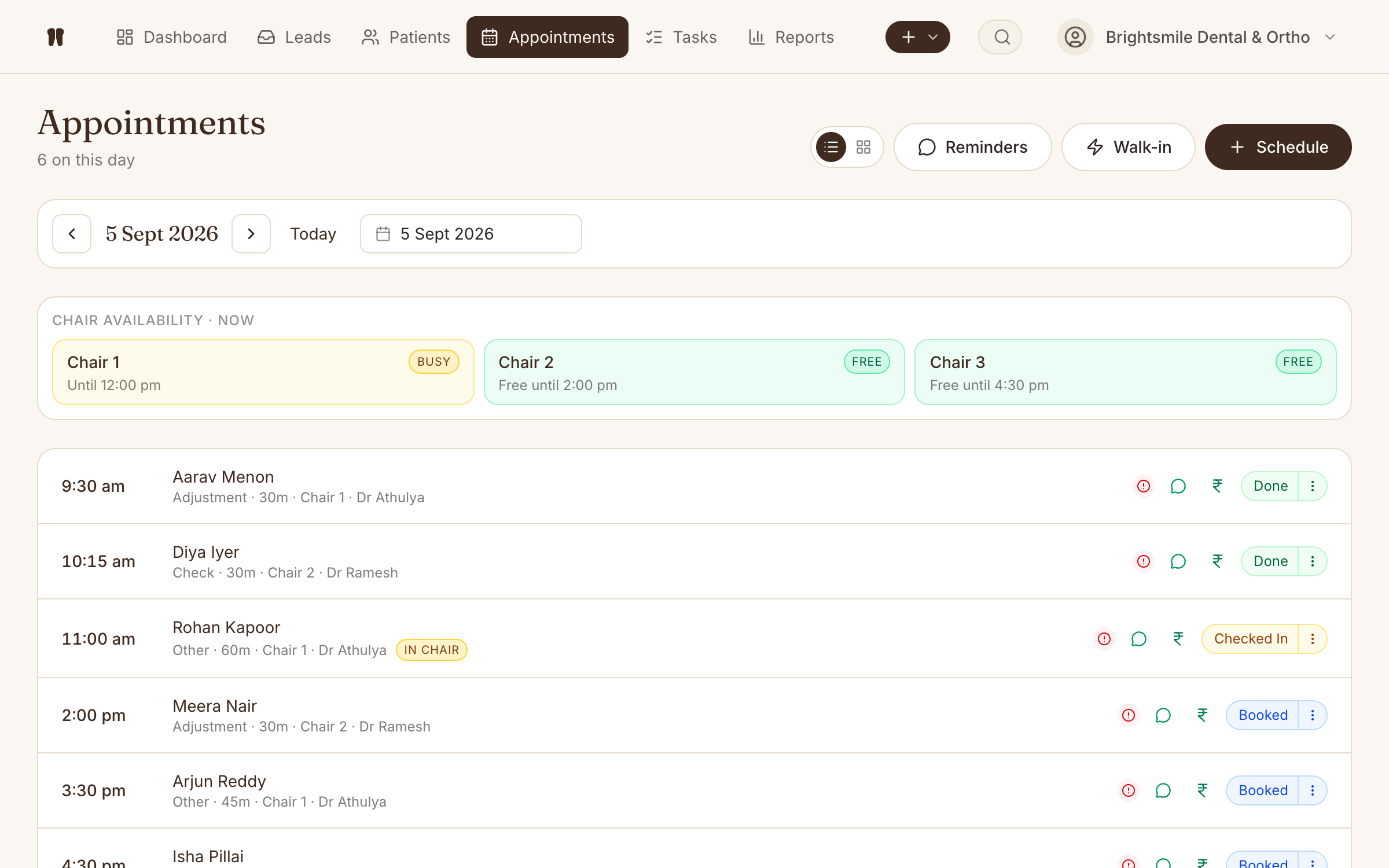
Kythro's appointment scheduler tracks every visit through booked, checked in, done, cancelled, and no show. One-tap status updates from the day's list, drag-to-reschedule on the chair timeline, and per-specialty subtype defaults so the chair-time for a filling, an adjustment, or a scaling is right by default.
The problem this removes
Phone-and-paper diaries hide no shows, double bookings, and reschedules until they cause real damage to the day.
How Appointments works in Kythro
- •One-tap status pill: click to advance through booked → checked in → done
- •Smart follow-up: schedule the next visit at last visit plus your clinic's default interval, configurable per clinic
- •Same as last visit: copy the previous visit's clinical notes forward in one click
- •Clinical-note templates as chips, filtered by the appointment's specialty and subtype
- •Specialty picker right on the booking form: appointment subtypes (filling, adjustment, cleaning, RCT, etc.) come from whichever specialties the clinic has enabled
- •Marking a clinical visit done with no notes opens the note editor automatically
- •Notes auto-lock 24 hours after the visit, with addenda for later amendments
- •Drag any block on the chair timeline to reschedule, snaps to 15 minutes
- •WhatsApp confirmations and reminders sent automatically
- •Per-appointment kits auto-decrement inventory on completion
Questions about Appointments
Does Kythro send appointment reminders?
Yes. Kythro sends WhatsApp confirmations on booking and a reminder 24 hours before the appointment, using the official WhatsApp Cloud API. Templates are configurable per clinic.
Can I see what is happening today at a glance?
Yes. The dashboard surfaces today's appointments with live status dots (booked, checked in, done, cancelled, no show), so the front desk can run the day without opening each record.
How do I mark a patient as checked in or done quickly?
Each appointment row has a one-tap status pill that cycles booked → checked in → done. Cancel and no-show live behind a small menu on the pill, so a misclick can't accidentally mark a patient absent.
Does the system suggest when to book the next visit?
Yes. When you schedule a follow-up from a patient's chart, the date defaults to the patient's last visit plus your clinic's default follow-up interval (set in Settings → Clinic info: 4 weeks for ortho clinics, configurable for any specialty).
What happens if I forget to write a clinical note?
When you mark a clinical-type visit (adjustment, bonding, debonding, check, records) as done with no clinical fields filled in, Kythro automatically opens the note editor with the appointment's template chips already visible. The nudge is dismissible if you really want to skip it.
Related features
Clinical note templates
Quick-fill snippets for clinical notes, filtered by specialty and visit subtype.
Clinical note addenda and finalization
Lock the original visit note, then amend with timestamped, author-stamped addenda.
Patient recall queue
Active patients with no upcoming visit, sorted by the longest gap first.
WhatsApp messaging
Send appointment reminders, follow-ups, and lead replies via the WhatsApp Cloud API.
Appointment kits
Pre-defined supply bundles attached to an appointment in one click.
Dashboard and KPIs
Today, tomorrow, leads, revenue, recall queue, and conversion in one screen.
Patient records
A complete digital chart for every patient, accessible from anywhere.
Ready to run appointments on Kythro?
Start a free 30 day trial. No credit card required.